
Your AI assistant wants to help with analytics – we just gave it the data it needs

Here's the thing: AI assistants like ChatGPT and Claude are really good at writing queries. They know syntax, they understand data structures, and they can translate your questions into working code. But they don't know what YOUR app tracks – your specific events, your custom parameters, the data that makes your app unique.
Until now.
Meet Export for AI: Custom insights without learning query syntax
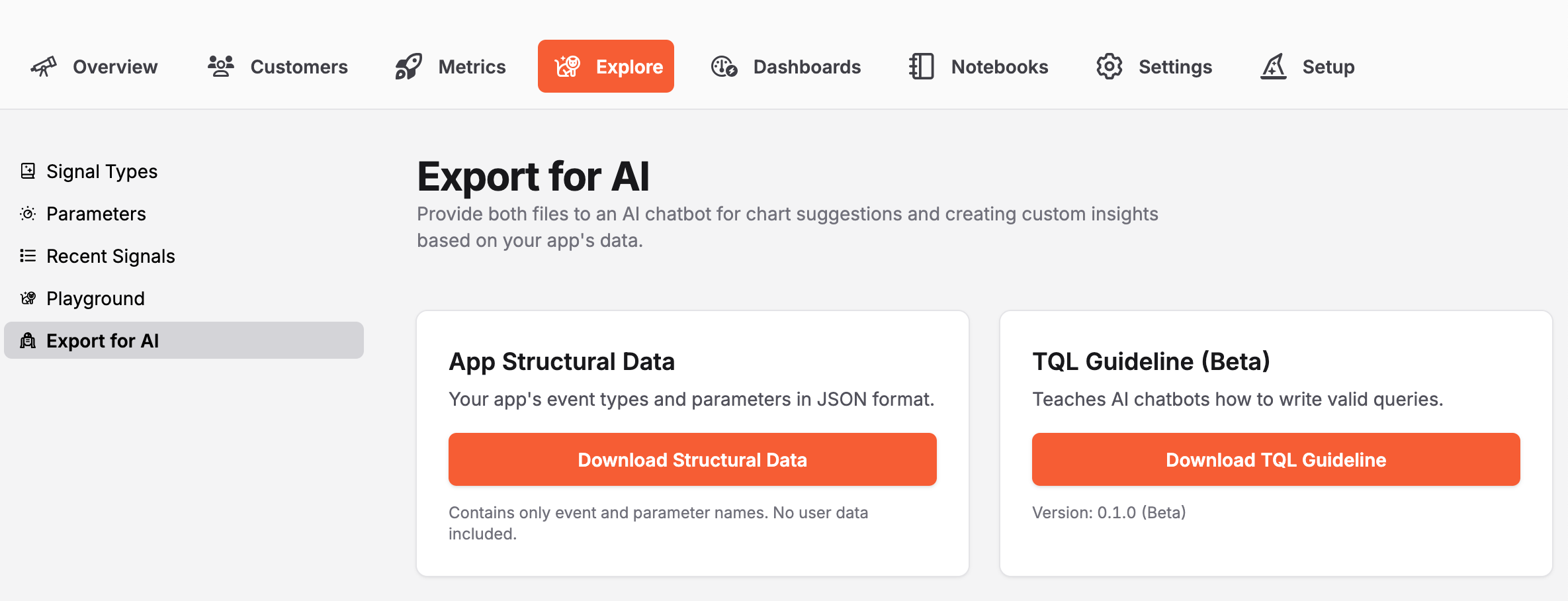
We've added a new feature to the Explore tab called Export for AI. It gives you two downloadable files designed to work together:
Your app's structural data – a JSON file containing every event type and parameter your app tracks. Think of it as a complete vocabulary of what's measurable in your specific app.
Structural Data for AI Export Snippet

{
  "description": "Structural data for TelemetryDeck app \"Knowledge Retrieval And Kinetics Exploration Nexus\". Contains all event types and parameters tracked by this app. Use this with the TQL Guideline to write queries and create charts. Note: Parameters may be event-specific, globally available, or a mix - not all parameters are available on all events.",
  "exportDate": "2025-12-08T11:45:26.914Z",
  "appId": "1234-5678-90",
  "appName": "Knowledge Retrieval And Kinetics Exploration Nexus",
  "events": [
    "App.didFinishLaunching",
    ...
    ],
  "parameters": []
}
The TQL guideline – a comprehensive markdown file teaching AI assistants how to write valid TelemetryDeck queries.
TQL Guideline AI Export Snippet

# TQL Complete Reference & Guide

**Version 0.1.0 (Beta)** | For AI Assistants | TelemetryDeck Query Language

---

## Table of Contents

**Part 1: Introduction & Core Concepts**

- 1.1 What is TQL?
- 1.2 Understanding the Data Model
- 1.3 Query Anatomy
- 1.4 How to Use This Guide
- 1.5 Dashboard vs API (Overview)

...
Provide both files to your favorite AI assistant, and suddenly it can write custom queries specifically for your app's data. No more spending hours learning syntax when you could be building features.
How AI-assisted analytics works
Let's say you're building a language learning app, and you want to see which lessons users complete most often:
- Head to your app's Explore tab and click "Export for AI"
- Download both files (takes about 10 seconds)
- Upload them to ChatGPT, Claude, or your AI assistant of choice
- Ask naturally: "Show me which lesson types are completed most frequently"
- The AI writes a working TQL query using your actual event names
- Copy it into TelemetryDeck, create your custom insight
What used to take an hour of documentation reading and trial-and-error now takes minutes. Time you can spend on product work that actually moves the needle.
Real questions this helps answer
This is for those specific questions that are unique to your app – the ones that help you make smart product decisions:
- "Which onboarding steps do users skip most often?"
- "Show me API error rates by endpoint and time of day"
- "Create a funnel for my checkout flow with drop-off rates"
- "Track feature adoption over time since we launched the redesign"
- "Which combinations of features do power users engage with?"
These are the kinds of insights that drive real product decisions. And now you don't need to become a query language expert to get them.
Why we built it this way
Privacy first, always. The structural data export contains only event and parameter names – the stuff you as a developer defined in your code. No user data, no personal information, nothing that could identify anyone. It's completely safe to upload to any AI assistant.
No lock-in. This works with ChatGPT, Claude, Gemini, or whatever AI assistant you prefer. We're not forcing you into any specific platform or workflow.
Two files are better than one. Separating the universal TQL knowledge from your app-specific data means we can update the guideline independently as the language evolves.
Ready to try it?
Navigate to the Explore tab in your TelemetryDeck Dashboard and look for the "Export for AI" option. Grab both files, upload them to your AI assistant of choice, and start asking questions.
We're excited to see what you discover. Share your creative uses with us on Bluesky, Mastodon, or Twitter!
Making analytics accessible shouldn't require a degree in data science. Sometimes it just requires asking the right questions in your own words.